
Your address will show here +12 34 56 78

Privacy Policy

Your privacy is important to us. It is Deucks Pty Ltd’s policy to respect your privacy regarding any information we may collect from you through our app, Bluetooth Finder.

We only ask for personal information when we truly need it to provide a service to you. We collect it by fair and lawful means, with your knowledge and consent. We also let you know why we’re collecting it and how it will be used.

We only retain collected information for as long as necessary to provide you with your requested service. What data we store, we’ll protect within commercially acceptable means to prevent loss and theft, as well as unauthorised access, disclosure, copying, use or modification.

We don’t share any personally identifying information publicly or with third-parties, except when required to by law.

Our app may link to external sites that are not operated by us. Please be aware that we have no control over the content and practices of these sites, and cannot accept responsibility or liability for their respective privacy policies.

You are free to refuse our request for your personal information, with the understanding that we may be unable to provide you with some of your desired services.

Your continued use of our app will be regarded as acceptance of our practices around privacy and personal information. If you have any questions about how we handle user data and personal information, feel free to contact us.

This policy is effective as of 19 February 2020.
0

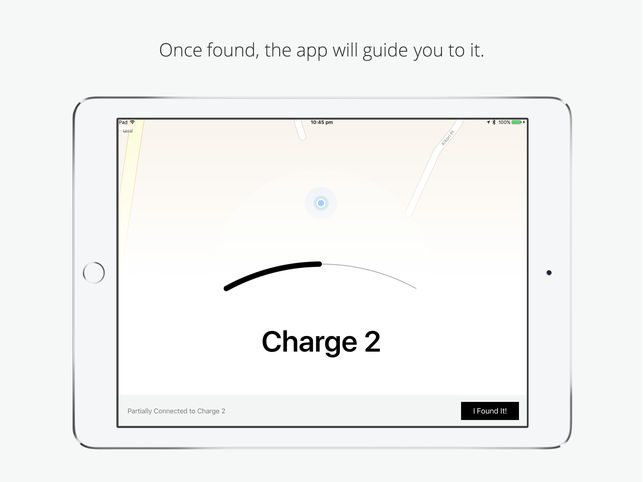
The Bluetooth Finder distance bar shows approximate location and distance from you and device you are trying to find.

The distance bar will move back and forth depending on how close you are. The signal to your device depends on the type of environment you are trying to find it in.

For example, you are trying to find your Pencil or device at home. Your home may contain may walls and rooms. The distance bar will fill in some rooms and not in some. You may have to keep looking in all rooms to see where the distance bar is the fullest. After you have determined this, you will be able further search in that room for the device as the distance bar will be more accurate.

0

The Bluetooth Finder distance bar shows approximate location and distance from you and device you are trying to find.

In this example,

Think of the distance bar of a hot and cold game. The more complete the bar is, the hotter/closer you are to your device and vice-versa.

0

If Bluetooth Finder is not able to find your Pencil in the app, you may need to wake it up by nudging objects around you.

What do we mean by this? Well, the Pencil actually has a sleep mode to save battery. When the Pencil is in sleep mode, it stops transmitting a beacon to the iPad.

The Apple Pencil can wake up to the slightest movement. Moving or nudging everyday objects such as bags, desks, drawers, clothes and even your car can wake up your Pencil.

When the Pencil is awake, our app Bluetooth Finder will be able to search and connect to your Pencil.

To see if your Pencil is able to be located in your surroundings, please look at this help post here.

0

Bluetooth Finder is an app developed by our Team. The purpose of this app is to help people to their lost or missing Apple Pencil. Bluetooth Finder has been successful in finding thousands devices and to that over a thousand Apple Pencils.

Bluetooth Finder can help you find your Apple Pencil (2015) and (2018). There are however a few steps that you will have to take to determine if our app will be able to help you find it.

0

Bluetooth Finder can find your pencil in various environments, but not all.

Answer a few questions below to see if Bluetooth Finder will be able to find your Pencil.

How long has it been since you have lost your Pencil ?

Bluetooth Finder works best if you have lost it within the last few minutes. However, in some cases Pencils that have been lost for a few days can also be found. 

Have you restarted your iPad after you lost your Pencil?

Bluetooth Finder will not be able to find your Pencil if you restarted your iPad after losing your Pencil. This breaks the pairing of the Pencil to the iPad.

Do you think you lost it in an open area? (e.g. you may have lost it in a train or bus and you are trying to find it at home)

Bluetooth Finder will not be able to find your Pencil from long distances. It will however be able to find your Pencil in short distances. A few examples being, offices, homes, cars, small outdoor areas etc.

There may be difficulties in locating your Pencil in open areas that are at a long distance from you. Bluetooth Finder works best when used within short distances from the Pencil.

Has your Pencil been stolen or lost?
Bluetooth Finder is able to find Pencils that have been mis-located and are stationary in an area around you. If your Pencil has been stolen, it may not be locatable. If this is the case contact your local authorities as soon as possible.

0